Xmonad/Using xmonad on Apple OSX
xmonad runs well under X11 on Apple OSX machines, and needs little work to be useful. This page collects advice and information on using xmonad successfully with OSX.
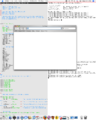
Apple OSX Tiger
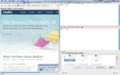
Apple OSX Leopard
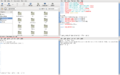
Apple OSX Leopard Fullscreen
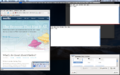
Expose


If you're using xmonad on a mac, add details about your configuration here!
Modern installation instructions
Any machine running Leopard or later should use these instructions. I am keeping the older ones below for historical reasons, but they are largely incorrect and can cause problems in various configurations and should not be used.
- Use the Haskell Platform installer for your platform. I may be able to dig up a Haskell Platform for Leopard PPC (G4, ppc7450) if needed, although it will not be the latest version because my PPC machine died.
- Either X11.app (standard install on Leopard and up) or MacOSForge XQuartz.app should work. Some releases of these have bugs related to the Command key; see below.
- Full-screen mode is a good idea (to the extent that it ever is; it does not interact nicely with Exposé/Mission Control or Alt-Tab application switching) because XMonad cannot manage Aqua windows.
Please note, that last is not a bug. Native Aqua windows do not support any kind of window manager mechanism; Apple scattered the functionality around within Core Graphics, WindowServer, and the application frameworks and didn't make any part of it replaceable. Neither XMonad nor any other X11 window manager will ever be able to manage native windows.
Configuring X11 to run xmonad
Create a file ~/.xinitrc.d/90-xmonad.sh:
#! /bin/sh
# "chmod +x ~/.xinitrc.d/90-xmonad.sh" to activate
# this assumes you used the Haskell Platform and cabal-install to install xmonad
USERWM=$HOME/Library/Haskell/bin/xmonad
Adjust the USERWM line to point to your xmonad binary; the one above assumes you used the official Haskell Platform installer for OS X and used cabal install xmonad to install XMonad.
chmod +x ~/.xinitrc.d/90-xmonad.sh will activate XMonad; chmod -x ~/.xinitrc.d/90-xmonad.sh will switch back to using quartz-wm.
You may want to go into X11.app Preferences, and on the Input panel select "Option keys send Alt_L and Alt_R", since neither XMonad nor most X11 programs understand Mode_shift. There is a tradeoff here: the default means Option gets you international characters, while toggling this allows you to use Alt-keys in X11 applications and XMonad.
If you want to use xmodmap to alter X11 key bindings, be sure to go into the X11.app preferences as above and toggle "Follow system keyboard layout"; if that is enabled, it will override xmodmap settings.
XMonad configuration
It is a good idea to use modMask = mod4Mask to define the mod key as Command on OS X, since not only do many programs use Option as Alt, X11 itself also does (Option-Shift-Enter toggles between the Aqua desktop and X11 full-screen mode, making it useless for launching a terminal).
You may want to go into X11.app Preferences, Input panel, and turn off "Enable key equivalents under X11" if you do this so X11 does not intercept Command-c etc. Note that this will also disable any hotkeys you defined on the X11.app Applications menu.
Installing on OSX Tiger
Installing XMonad
- ghc: You can get from haskell.org/ghc, MacPorts, or Fink. Fink has an older version of ghc -- one that will work with xmonad (for now?), but will make baby xmonad cry.
- X11 lib: Get from hackage.haskell.org, build using the standard Cabal steps. Make sure that Xinerama gets detected in the configure step. If you see a "present but not compiled" warning, that might be okay (it worked for me).
- xmonad and xmonad-contrib: Get from hackage.haskell.org, build using the standard Cabal steps.
I installed into my home directory by adding "--user --prefix=$HOME/usr" to the configure steps. The default is /usr/local.
Configuring Your .xinitrc to Run XMonad
- Build and install XMonad like you would any other Haskell library.
- do the following on the Terminal:
$ cp /private/etc/X11/xinit/xinitrc ~/.xinitrc $ chmod +w ~/.xinitrc $ vim ~/.xinitrc #comment out the line 'exec quartz-wm' and add PATH-TO-XMONAD/xmonad after it. - You may want to add
quartz-wm --only-proxy &to your xinitrc, which synchronizes X11/OSX clipboards. - Open X11. XMonad should be running now.
Configuring Xmonad for OS X
- You probably don't have a numlock key. Set numlockMask to 0. (The default is mod2Mask, which happens to be Apple's default for the command key.)
- You may use the defaultGaps to make xmonad not clash with the dock. As the dock size is configurable and may vary depending on the number of icons in the dock you will have to measure your dock yourself. Before 0.7 defaultGaps are in xmonad, since 0.7 these should be in xmonad-contrib.
Full screen mode
I highly recommend running X11 in full-screen mode. To enable this, open the Preferences dialog for the X11 app, check the checkbox, and restart X11. This way, you don't have to worry about stupid things like the dock / menubar / OS X apps getting in your way.
Does Not Replace Quartz, Silly
You won't be able to use xmonad to manage normal OS X apps. X11 will just be another OS X application sitting in your dock that you can switch to. However, it is pretty easy to install a decent set of X11 apps. If you have MacPorts installed you can install the packages firefox-x11, rxvt-unicode, unclutter, and 'vim +gtk2' (the +gtk2 variant for PRIMARY/CLIPBOARD support) to get started.
Fitting Other Bits For Use With xmonad on OS X
dmenu can be built on OS X without problems but it is invisible unless you run X11 in full-screen. Unlike xmonad it does not detect the OS X top menu bar and is completely hidden by it. You can also make it display at the bottom (behind the dock :).
Since I do not know how to detect the top menubar either I just patched dmenu to add support for gaps. Unfortunately the dmenu authors do not seem very responsive so I attach the patch here.
You can then run dmenu -g 22 to work around the OS X top menu.
Potential Configuration Problems
You may have problems with configuring XMonad under OSX - if you see the "error detected while loading xmonad configuration" error message but with no error output, it could be because the PATH inherited by XMonad doesn't include ghc (eg by default it won't include /usr/local/bin).
Possible solutions:
- http://forums.macosxhints.com/showthread.php?s=&threadid=12382
- http://forums.macosxhints.com/showthread.php?t=14279
- Or just hardwire the path into xmonad itself - change "ghc" -> "/usr/local/bin/ghc" (or whatever) in Core.hs before building XMonad.
OLD Installing on OSX Leopard
These instructions have been tested on a blank but fully updated system (04/04/09).
Installing xmonad
Installing GHC
- Install xcode, this can be found on the OSX install disk; it can also be downloaded from apple (you will have to sign upto a free developer account).
- Download and install ghc.
Configuring Your .profile
Insert the following into your ~/.profile
export PATH=$PATH:~/.cabal/bin:/usr/local/bin
export USERWM=`which xmonad`
Much of this isn't needed until later, but it's good to get it out the way now.
Installing Cabal
- Download and extract Cabal install from http://www.haskell.org/cabal/download.html
- In a terminal:
$ cd ''Cabal install directory''; ./bootstrap.sh
- Update cabal
$ cabal update
- Install xmonad
$ cabal install xmonad
- Download and extract dmenu from http://tools.suckless.org/dmenu
$ cd ''dmenu directory''; sudo make install
Updating X11
The version of X11 shipped with Leopard (04/04/09) does not support going fullscreen. I recommend updating X11. It is likely that a Leopard update will eventually make this step unnecessary. Download and install the latest version from macosforge.
Configuring Your .xinitrc to Run XMonad
write:
source ~/.profile
exec /usr/X11/lib/X11/xinit/xinitrc
to ~/.xinitrc
Alternatively, if this doesn't work (because you haven't updated X11): write:
source ~/.profile
exec $USERWM
to ~/.xinitrc
Configuring Your Keyboard
I can't find the meta key (xmonad is unusable without it) in the default configuration. I followed this guide (write
clear Mod1
clear Mod2
keycode 63 = Mode_switch
keycode 66 = Meta_L
add Mod1 = Meta_L
add Mod2 = Mode_switch
to ~/.Xmodmap) and now the meta key is the left alt.
Further Configuring
- The menu bar shouldn't get in the way (fullscreen or otherwise, updated or standard X11). The Dock however will, I recommend hiding the Dock or always working in fullscreen mode.
- You can start X11 (and Xmonad) by running any program that uses X, or by running X11.app. If you run X11.app a default program is started. You can configure this program by running
$ defaults write org.x.X11 "app_to_run" "gnome-terminal"
(replace gnome-terminal with a program of your choice). or$ defaults write org.x.X11 "app_to_run" ""
to have no application run by default. - There shouldn't be anything unusual about configuring ~/.xmonad/xmonad.hs.
Discussion
- XMonad and Vimperator (Firefox 3 extension) make a powerful combination on Linux. I cannot achieve this on OSX because the newest X11 version of Firefox I can install is version 2. If anyone has any hints on installing Firefox 3 X11 please share them.
- XMonad only works with X11 software- a package manager such as:
- Nix http://nixos.org/nix/ .
- Port is helpful http://www.macports.org/ .
- Fink http://www.finkproject.org/ .
- Homebrew http://mxcl.github.com/homebrew/ .
OLD Installing on Snow Leopard
Xmonad 0.9.1 compiles on Snow leopard with ghc 6.12, on a clean snow leopard installation and the X11 version provided with it. Since xterm has been modified, the configuration now needs to be :
in ~/.profile :
export PATH=/Users/me/.cabal/bin:$PATH
export USERWM=`which xmonad`
in ~/.xinitrc :
source ~/.profile
exec $USERWM
in ~/.Xmodmap :
clear Mod1
keycode 63 = Meta_L
add Mod1 = Meta_L
This maps the left apple key to the meta key expected by xmonad, since xterm no allows to type accented characters on american keyboards with the option key (as in cocoa applications).
Alternatively, you can use the left Alt key (keycode 66 = Alt_L) that doesn't conflict with OS X default shortcuts bound on the left Command (Apple / Meta) key.